

Find and Manage Your Google Review History
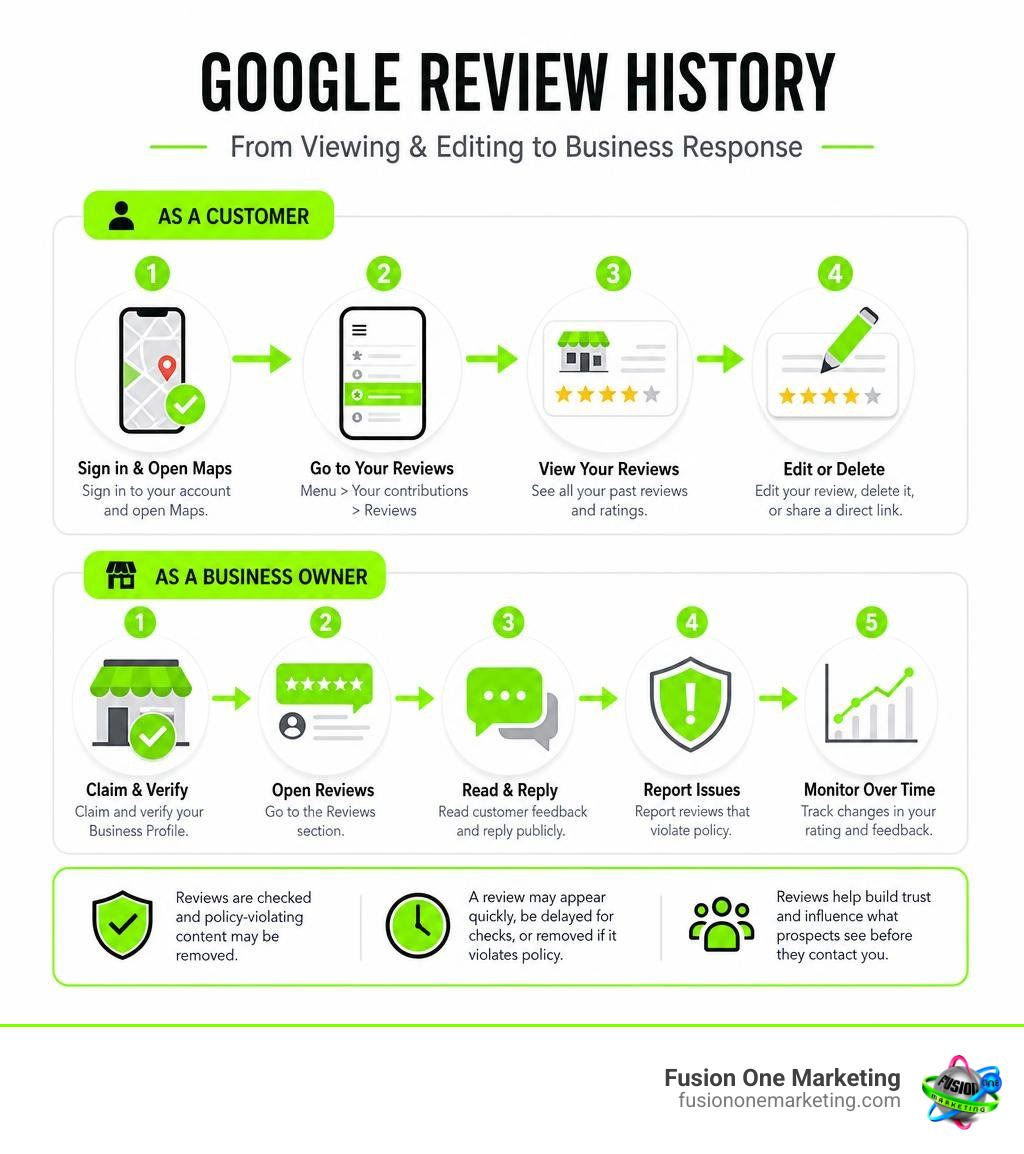
To find your google review history as a customer, sign in to the Google account you used, open Google Maps, then select Menu > Your contributions > Reviews. There, you can view past ratings, edit a review, delete it, or share a direct link.
If you own a business, claim and verify your Google Business Profile. You can then open the Reviews section to read customer feedback, reply publicly, report policy-breaking reviews, and monitor changes in your rating over time.
Reviews matter because they shape what prospects see before they call. Google processes billions of reviews, while also removing or blocking fake and policy-violating content. That means a review may appear quickly, be delayed for checks, or disappear if it violates policy.
I am Rob Humm, co-owner of Fusion One Marketing, and I have worked in local search and digital marketing since 2011. I help local businesses use google review history, customer feedback, and practical visibility strategies to make smarter marketing decisions.
Google review history terms made easy:
How to Access and View Your Personal Google Review History

Finding past feedback you left for a local plumber, favorite dining spot, or home contractor should not feel like finding a needle in a digital haystack. Yet, because Google routes user activity through distinct account dashboards, many users struggle to pinpoint their past remarks.
Every rating and photo you publish attaches directly to your public Google account identity. There are no truly anonymous reviews on Google Maps. If you need official step-by-step guidance, Google details the full technical workflow on how to Add, edit, or delete Google Maps reviews & ratings – Computer.
Tracking Google Review History on Google Maps Desktop
On a desktop computer, accessing your review record takes only a few clicks:
- Open your web browser and navigate to Google Maps while signed into your Google account.
- Click the three-line hamburger menu icon in the top-left search corner.
- Select Your contributions from the menu panel.
- Click the Reviews tab.
Here, you will see an entire chronological list of every place you have evaluated. You can click on any individual entry to view its permalink, see attached photos, or check whether other users marked your feedback as helpful. Learning how to rate a business on Google in under two minutes makes keeping these community contributions fresh and accurate straightforward.
Viewing and Managing Reviews on Mobile and Google Play
On Android or iOS mobile devices, open the Google Maps app, tap your circular profile icon in the top right, and select Your profile (or Your contributions). Tap the Reviews tab to scroll through your past ratings.
If you review mobile apps, Google categorizes those separately from physical map locations. App store ratings do not show up inside Google Maps. To view your app feedback on an Android device:
- Open the Google Play Store app.
- Tap your profile icon in the top right corner.
- Tap Manage apps & devices, then select Ratings & reviews.
- Switch to the Posted tab to inspect or revise your app feedback.
Behind the scenes, Google organizes app feedback with detailed technical logs. The REST Resource: reviews | Google Play Developer API | Google for Developers documentation shows that Google stores nanosecond timestamps, device operating system versions, and developer interaction histories alongside user ratings.
How to Edit or Delete Past Reviews
Circumstances change. Perhaps a business resolved an issue you experienced, or you realized you reviewed the wrong service provider. Modifying or removing a review is simple:
- To Edit: Locate the review under Your contributions > Reviews, click the three-dot action menu beside the entry, select Edit review, adjust your star rating or commentary, and click Post.
- To Delete: Tap or click the three-dot menu on the specific entry, select Delete review, and confirm your choice.
When you edit a published entry, Google updates the publicly displayed timestamp to show the date of your latest edit rather than the original submission date. If you delete a review, the removal is permanent across Google Maps.
Managing Reviews on Your Google Business Profile
For business owners, keeping a close eye on incoming customer reviews is a fundamental daily task. Your Google Business Profile (GBP) functions as the front porch of your digital presence. Whether you run a plumbing service in Birmingham, AL, an HVAC company in Huntsville, AL, or a lawn care service in Helena, AL, your review record directly influences potential customers.
Why Monitoring Business Google Review History Matters for Local SEO
Review signals carry massive weight in local search algorithms. In competitive top search positions, review volume, recency, and sentiment account for roughly 26% of local SEO ranking influence.
Understanding do Google reviews impact your SEO helps explain why consistent feedback is critical. Google uses customer feedback to establish entity authority and relevance. When local clients frequently leave detailed reviews mentioning specific services—such as heat pump repairs or emergency pipe fixes—Google’s search systems associate your business listing directly with those search queries.
Responding to Customer Feedback and Rating Trends
Consumer behavior studies show that 88% of customers are likely to choose a business that replies to all of its reviews. Responding demonstrates that you value customer satisfaction and stand behind your work.
Knowing how to handle negative feedback online protects your brand reputation:
- Respond promptly: Aim to acknowledge all feedback within 24 to 48 hours.
- Stay objective: Never argue publicly with an unhappy reviewer. Acknowledge their frustration calmly.
- Take complex issues offline: Provide a direct phone number or email address to resolve specific complaints privately.
- Thank positive reviewers: Reinforce customer loyalty with a warm, genuine note of thanks.
Exporting and Archiving Your Business Review Data
Google does not include a single “Export All Reviews” button inside the standard Business Profile dashboard, but maintaining an offline archive protects your operational records. Here is how businesses manage review backups:
- Google Takeout: You can download your overarching Google account data, including business profile contributions and history, via Google Takeout in JSON or CSV formats.
- Google Cloud Storage Developer Buckets: Enterprise and app teams handling large feedback volumes utilize Google Cloud Storage reporting buckets to pull monthly review CSV archives.
- Review Aggregation Platforms: Specialized reputation management software automatically syncs, backs up, and exports your review history into structured spreadsheets.
Why Google Reviews Are Delayed, Missing, or Removed
One of the most frequent challenges local business owners encounter is the missing review dilemma. A customer mentions leaving a glowing 5-star review, yet days later, nothing appears on your listing. Understanding Google Business Profile reviews not showing up here’s why helps demystify Google’s automated moderation systems.
Typical Timelines for Reviews to Appear Publicly
Most legitimate customer reviews appear publicly within minutes to 24 hours. However, timelines fluctuate depending on reviewer account authority and automated safety checks:
| Reviewer Account Type | Moderation Trigger Level | Typical Publication Timeline |
|---|---|---|
| Established Account (6+ Months Active) | Low algorithmic friction | 0 to 15 minutes |
| New or Low-Activity Account | Standard safety checks | 24 to 72 hours |
| Reviews Containing Links, Phone Numbers, or High Velocity | Deep spam filter scan | 3 to 14 days (or suppressed) |
| Regulated Industries (Medical, Legal, Finance) | Compliance content verification | 3 to 14 days |
Understanding Spam Filters, Account Authority, and Moderation Delays
Google’s review infrastructure serves over 2 billion monthly users. In 2023 alone, Google blocked or removed 170 million policy-violating and fake reviews using machine learning algorithms and real-time moderation systems.
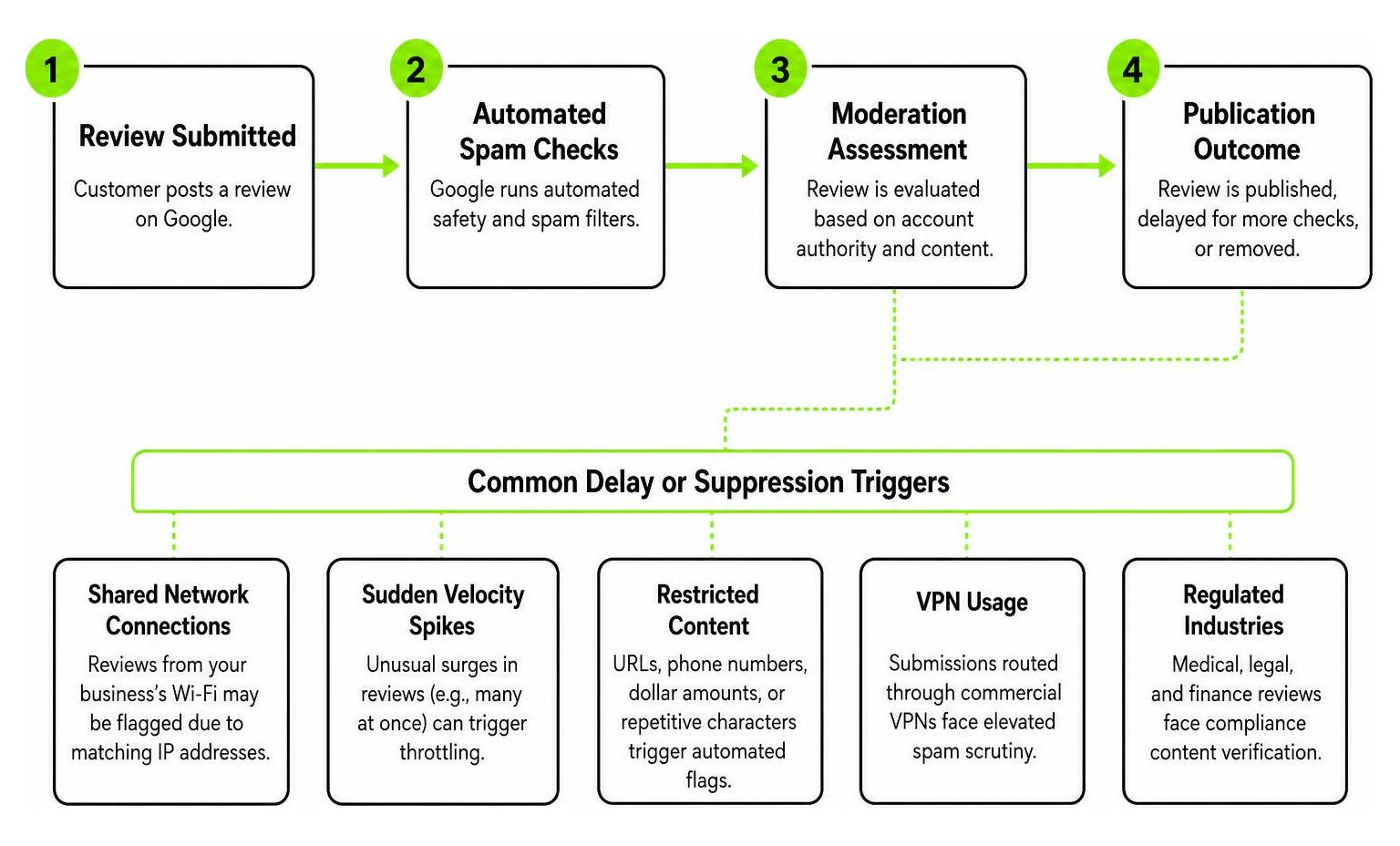
Reviews are commonly delayed or filtered out due to specific triggers:
- Shared Network Connections: If a customer leaves a review while connected to your business’s guest Wi-Fi, Google’s algorithms may flag it as an internal conflict of interest due to matching IP addresses.
- Sudden Velocity Spikes: If your business historically receives two reviews per month and suddenly gets thirty in a single afternoon from an email blast, automated filters may throttle publication.
- Restricted Content: Inclusion of URLs, phone numbers, dollar amounts, or repetitive non-standard characters triggers automated flags.
- Virtual Private Networks (VPNs): Submissions routed through commercial VPN servers often face elevated spam scrutiny.
Flagging Inappropriate Content and Removal Timelines
If your listing receives a review that violates Google’s Prohibited and Restricted Content policies—such as hate speech, harassment, fake engagement, or commercial solicitation—you can flag it directly:
- Locate the offensive review on your public Google Maps listing or GBP dashboard.
- Click the three dots next to the entry and select Report review.
- Choose the specific policy violation category that applies.
Clear-cut automated violations are often evaluated and removed within a few hours to 3 days. Complex reviews that require manual human moderation queues typically take between 4 business days and 3 weeks. If a flagged review does not violate explicit written policies (such as an authentic customer expressing an unpleasant subjective opinion), Google will keep the review live.
The Evolution of Google’s Review Algorithm: From Batch Updates to Real-Time AI
Google’s evaluation of user feedback and review content has evolved significantly over the past several years, shifting from periodic batch adjustments to an integrated, continuous quality framework.
Timeline of Google Product and Review Systems
- April 2021 (Original Launch): Google introduced the Product Reviews Update to reward comprehensive, in-depth evaluation over thin, scraped summary pages.
- December 2021 – March 2022: Successive updates added quantitative evaluation signals, requiring visible proof of experience and multimedia evidence.
- February 2023: The system expanded internationally to 10 additional languages, causing a 150% spike in search volatility across tracked review categories.
- April 2023: Google officially rebranded the initiative from the “Product Reviews System” to the broader “Reviews System,” expanding its criteria to evaluate all types of recommendation, service, and analysis content.
- November 2023: Google rolled out its final standalone review update, transitioning review evaluation mechanisms into its core search systems.
Modern Continuous Evaluation and Gemini AI Filters
Search evaluations operate continuously in the background. Google’s March 2024 Core Update reduced low-quality, unoriginal content across search results by approximately 45%.
In local search, review systems incorporate Gemini-powered AI detection models to identify synthetic text, coordinated review rings, and unnatural submission patterns. The focus centers entirely on authentic user experiences (Experience, Expertise, Authoritativeness, and Trustworthiness — E-E-A-T), ensuring real feedback from real local customers carries the greatest visibility.
Displaying and Leveraging Reviews Across Your Website and Platforms
Collecting outstanding Google feedback is only half the battle; putting that social proof to work across your digital marketing ecosystem drives true growth. Exploring how to re purpose a review lets you transform brief positive comments into compelling sales assets.
Centralizing Multi-Platform Customer Testimonials
Managing reviews across individual platforms—like Google Maps, Facebook, and niche directories—can quickly become overwhelming. Using an integrated review dashboard centralizes incoming feedback:
- It alerts your management team instantly whenever a new review posts anywhere online.
- It prevents negative feedback from going unnoticed and unaddressed.
- It maintains consistent response rates across every channel where customers evaluate your work.
Pairing automated tracking with the ultimate guide to getting more Google reviews creates a steady, sustainable stream of authentic customer ratings.
Embedding Customer Reviews on Your Website
Embedding dynamic Google review widgets on key service pages, homepages, and contact forms improves conversion rates. When prospects see live, verified star ratings next to your service offerings, trust increases immediately.
To maximize the SEO value of your on-site testimonials:
- Utilize official API embeds or trusted widget tools that incorporate structured review Schema markup.
- Highlight specific reviews that match the page content (e.g., placing heating repair reviews directly on your furnace installation page).
- Include links encouraging satisfied website visitors to share their own experiences.
Frequently Asked Questions About Google Reviews
Why can’t I see a review I recently posted on Google Maps?
If a review you submitted does not appear publicly, it is usually because:
- You are signed into a different Google account than the one used to write the review.
- The review was temporarily held by automated filters for standard spam and policy checks.
- The review contained restricted elements, such as external links or phone numbers, causing automated suppression.
Does editing a past Google review update the published date?
Yes. Whenever you edit the text, star rating, or photos of a previously published Google review, Google updates the public date stamp to reflect the date of your latest edit. The original submission date is replaced by the revision date on Google Maps.
How long does Google take to review and remove a flagged comment?
Automated policy removals typically resolve within 24 to 72 hours. If a flagged review requires review by a human moderation team, the process generally takes between 4 business days and 3 weeks. If no action occurs after 21 days, the flag was likely evaluated and determined not to violate Google’s content policies.
Conclusion
Managing your Google reviews—whether auditing your personal contribution history or protecting your company’s online reputation—is essential in today’s digital landscape. For local service businesses across Alabama, consistent 5-star ratings build authority, drive search visibility, and convert prospects into loyal clients.
At Fusion One Marketing, our all-in-one “Digital Domination” program combines advanced SEO, high-converting web design, reputation management, and targeted PPC advertising to help your business lead its market. Discover how to get more company reviews and grow your business today, and let our team build a dependable pipeline of authentic customer feedback for your brand.