

Why Google Review Management Is the Secret to Winning Local Business
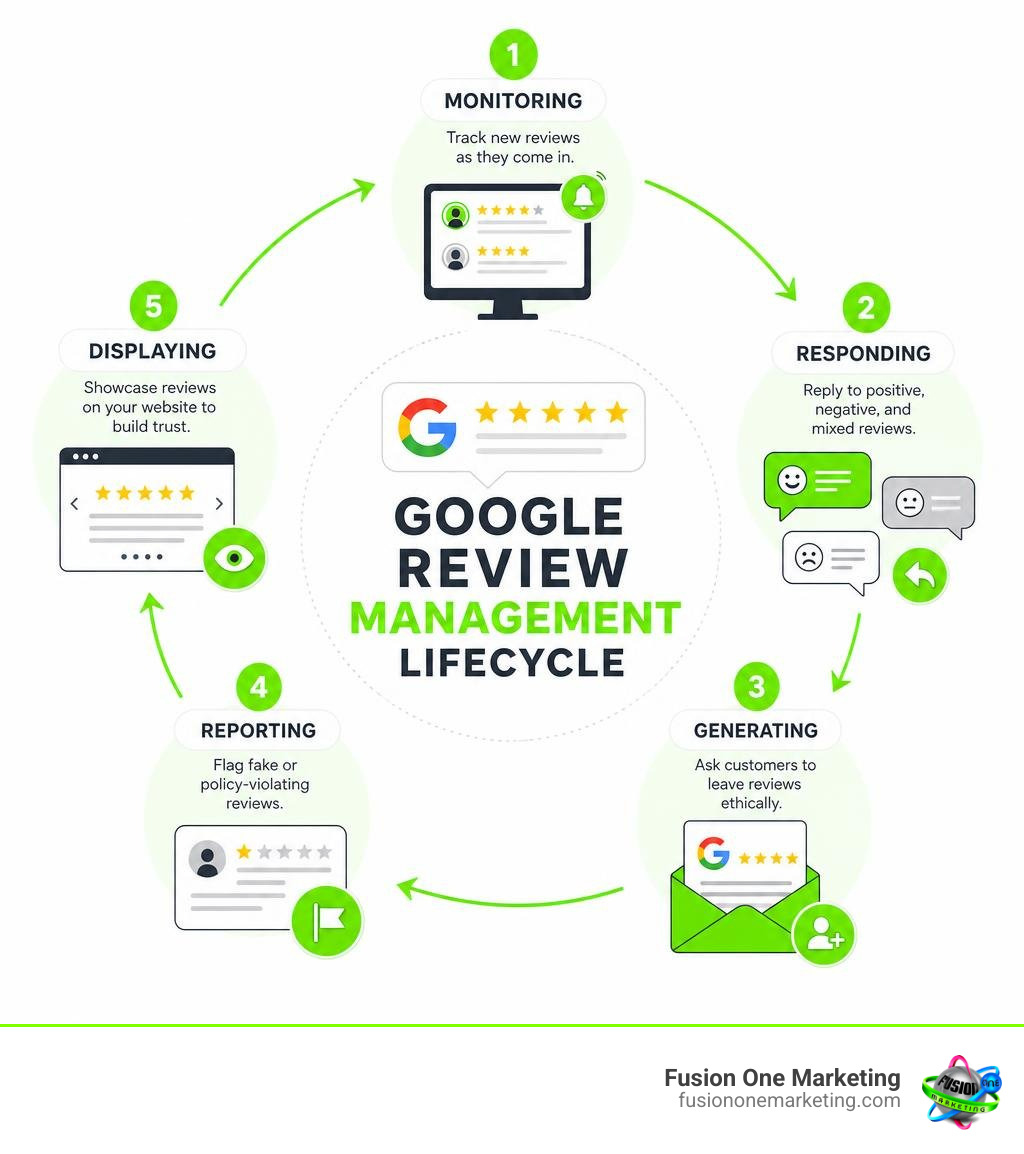
Google review management is the process of monitoring, responding to, and generating customer reviews on your Google Business Profile to protect your reputation and grow your business.
Here’s what it covers at a glance:
| Task | What It Means |
|---|---|
| Monitoring | Tracking new reviews as they come in |
| Responding | Replying to positive, negative, and mixed reviews |
| Generating | Asking customers to leave reviews ethically |
| Reporting | Flagging fake or policy-violating reviews |
| Displaying | Showcasing reviews on your website to build trust |
If you run a home services business — plumbing, HVAC, landscaping, or anything in between — your potential customers are checking Google before they ever call you. In fact, 81% of consumers read Google reviews to assess a business, and more than 60% rely on a company’s Google Business Profile to learn more about them.
That’s not a small detail. That’s your first impression.
The problem most small business owners face isn’t that they don’t care about reviews. It’s that between running a crew, quoting jobs, and keeping customers happy, review management falls through the cracks. Reviews pile up without responses. Negative feedback sits unanswered. And the business down the street with 100+ reviews keeps winning the jobs you should be getting.
This guide changes that.
I’m Rob Humm, co-owner of Fusion One Marketing and a digital marketing specialist with over a decade of experience helping local businesses grow through strategies like Google review management, Local Search, and Pay-Per-Click. I’ll walk you through exactly how to take control of your reviews — without it taking over your day.
Simple google review management glossary:
What is Google Review Management and Why Does It Matter?

At its core, google review management is about taking active ownership of your digital reputation. It is not a passive task where you set up a profile and hope for the best. Instead, it is a continuous cycle of listening to your clients, engaging with their feedback, and using those insights to steer your business toward growth.
When you actively manage your reviews, you are not just checking a box for search engines. You are actively building brand credibility. Consumers want to know that behind the logo is a team of real, responsive professionals who care about the quality of their work.
To understand the full scope of why this process is so vital, it helps to look at Why Online Reviews Are So Important For Your Business and explore Why Reviews Matter in the broader context of modern digital marketing. When you make review management a priority, you establish a direct line of communication with your community in Birmingham, Huntsville, and Helena, AL, showing everyone that you are open, active, and reliable.
The Psychology of Consumer Trust
The way consumers interact with reviews is deeply psychological. Today, an overwhelming 92% of consumers read online reviews and testimonials when purchasing. When they look at your profile, they are searching for validation that they are making the right choice. Interestingly, 69% of consumers feel optimistic about using a business with positive reviews.
However, consumer trust is highly nuanced. There is a specific threshold of trust that you must cross before a searcher will pick up the phone:
- The Trust Threshold: The average consumer needs at least 10 reviews to trust a local business. If you only have three or four reviews, even if they are five-star ratings, searchers may remain skeptical.
- The Sweet Spot: You might think a perfect 5.0 rating is the ultimate goal, but research from the Spiegel Research Center shows that ratings of 4.2 to 4.5 are the most trusted by consumers. A flawless 5.0 score can actually look suspicious or manufactured, whereas a few minor complaints mixed with stellar praise make your business look authentic.
- The Recency Factor: Reviews have a shelf life. 84% of consumers do not think reviews older than three months are relevant. If your last review was from late last year, consumers might wonder if your service quality has slipped or if you are still actively in business.
Understanding this dynamic is the Next Step in Google Business Reviews: Trusting Them and using that trust to win over hesitant prospects.
Customer Retention and Engagement
While reviews are fantastic for attracting new customers, they are equally powerful for keeping the ones you already have. Many business owners forget that Why Responding to Your Customers Online Is Crucial relates directly to customer retention and lifetime value.
Consider the math behind a healthy business: returning customers make up only 8% of all customers, but they account for a massive 40% of a company’s revenue. Combine that with the fact that acquiring a new customer is up to 25 times more expensive than keeping an existing one, and the value of retention becomes crystal clear.
When you respond to a review, you are engaging with a customer who has already paid you. You are showing them that their experience mattered. Highly engaged customers make purchases 90% more frequently and spend 60% more per purchase than average customers. A simple, thoughtful reply to a review is a low-cost, high-return way to build long-term brand loyalty.
How Reviews Power Your Local SEO Strategy
If you want your plumbing, HVAC, or landscaping business to show up in the coveted Google Map Pack when someone searches for services in Birmingham or Huntsville, you need to understand how local SEO works.
Google’s primary goal is to deliver the best, most relevant local results to its users. To do this, its algorithm relies heavily on trust signals, and online reviews are one of the top three ranking factors for local search engine optimization. When you actively manage your reviews, you are feeding the algorithm the exact signals it needs to rank your business higher. For a deeper dive into this connection, read about The Importance of Online Reviews.
That ranking at the top is incredibly lucrative: the first Google search result gets 31.7% of all clicks. If your business is buried on page two or lower down in the local finder, you are missing out on nearly a third of the market.
Why Google Review Management Matters for Local SEO
To search engines, review activity is a sign of life. There are three key elements of review activity that directly influence your local search visibility:
- Review Velocity: This refers to how frequently you receive reviews. A steady stream of new reviews tells Google that your business is active, popular, and currently serving customers. A sudden burst of 50 reviews followed by six months of silence looks unnatural and can flag spam filters.
- Review Diversity: Google likes to see reviews coming from a variety of users. It also looks at the diversity of the content within those reviews. When customers mention specific services (like “AC repair” or “drain cleaning”), it helps Google understand exactly what you do.
- Keyword Optimization: When customers naturally include keywords in their reviews—such as your city name or specific services—it boosts your local relevance. While you cannot tell customers what to write, you can strategically include these keywords in your replies to reinforce your local authority without overdoing it.
How to Respond to Every Type of Google Review

Knowing how to respond to reviews is a critical skill for any business owner. It is not just about typing a quick “thank you.” It is an opportunity to showcase your customer service standards to the public.
50% of consumers expect a response within 7 days of posting an online review, and 71% of consumers are more likely to patronize a business that answers its online reviews. When you reply, you are talking to the reviewer, but you are also writing for the hundreds of prospective customers who will read that reply in the future.
Before you can reply, you must verify your business profile. Once verified, you can follow the official steps to Manage customer reviews – Google Business Profile Help. For a complete strategic overview, check out The Basics of Online Reputation Management.
Crafting the Perfect Response to Positive Reviews
A positive review is a gift of free marketing. Do not let it go to waste with a generic, automated response. Use these steps to craft a perfect reply:
- Express Gratitude: Start by thanking the customer sincerely for their time and their business.
- Personalize It: Mention the customer by name, and reference specific details from their project (e.g., “It was a pleasure installing your new heat pump, Sarah!”).
- Use Brand Keywords: Incorporate your main services and service areas naturally (e.g., “We love providing top-tier landscaping services to our neighbors here in Helena, AL!”). This helps with local SEO.
For more tips on maximizing these positive interactions, explore Getting 5-Star Reviews.
Turning Negative Reviews into Positive Experiences
Negative reviews can be frustrating, but they are also an incredible opportunity to show how you handle conflict. A defensive or angry response will drive potential customers away, whereas a calm, professional reply can actually win them over.
- Keep Your Cool: Take a deep breath before replying. Never engage in personal attacks or share private customer details.
- Acknowledge and Validate: Apologize for the fact that their experience did not meet expectations, even if you feel the complaint is unfair.
- Migrate Offline: Do not try to resolve a complex issue in the public comment section. State clearly that you want to make things right and provide a direct phone number or email address for them to contact you.
To learn more about this process, read our guides on How to Turn a Negative Review Into a Positive Experience and How to Handle Negative Feedback Online.
Navigating Mixed and Neutral Feedback
Mixed reviews (usually 3-star ratings) can be tricky because they contain both praise and criticism.
The best approach is to offer a balanced response. Thank them for the positive aspects of their experience, and directly address the areas where you fell short. For example, if a client praises your plumbing work but mentions that your technician arrived late, you might write: “Thank you for highlighting our quality work! We apologize for the delay in our arrival time and are actively working on improving our scheduling efficiency.” This shows that you are listening and committed to continuous improvement.
Ethical Strategies to Boost Your Review Volume
To compete effectively in your local market, you need a proactive strategy to gather more reviews. However, you must do this ethically and in line with Google’s guidelines.
There are several highly effective, non-intrusive ways to ask your clients for feedback. For a complete list of creative ideas, look at How to Score Free Google Reviews and Make Your Competitors Jealous. You can also review the official Tips to get more reviews – Google Business Profile Help.
One of the most powerful tools at your disposal is mobile communication. Consider these statistics:
- Text messages (SMS) have an incredible open rate of 98% and click-through rates of around 19%.
- WhatsApp review requests achieved a stunning 94% response rate when tested with automated review tools, making it one of the highest-yielding channels available.
By sending a short, friendly text message with a direct link to your Google Business Profile within 24 hours of completing a job, you make it incredibly easy for your clients to leave a review while the experience is still fresh in their minds.
Google’s Policies on Incentives and Gating
When building your review generation campaigns, you must stay strictly compliant with Google’s Terms of Service. Failing to do so can result in severe penalties, including having all your reviews deleted or your business profile suspended.
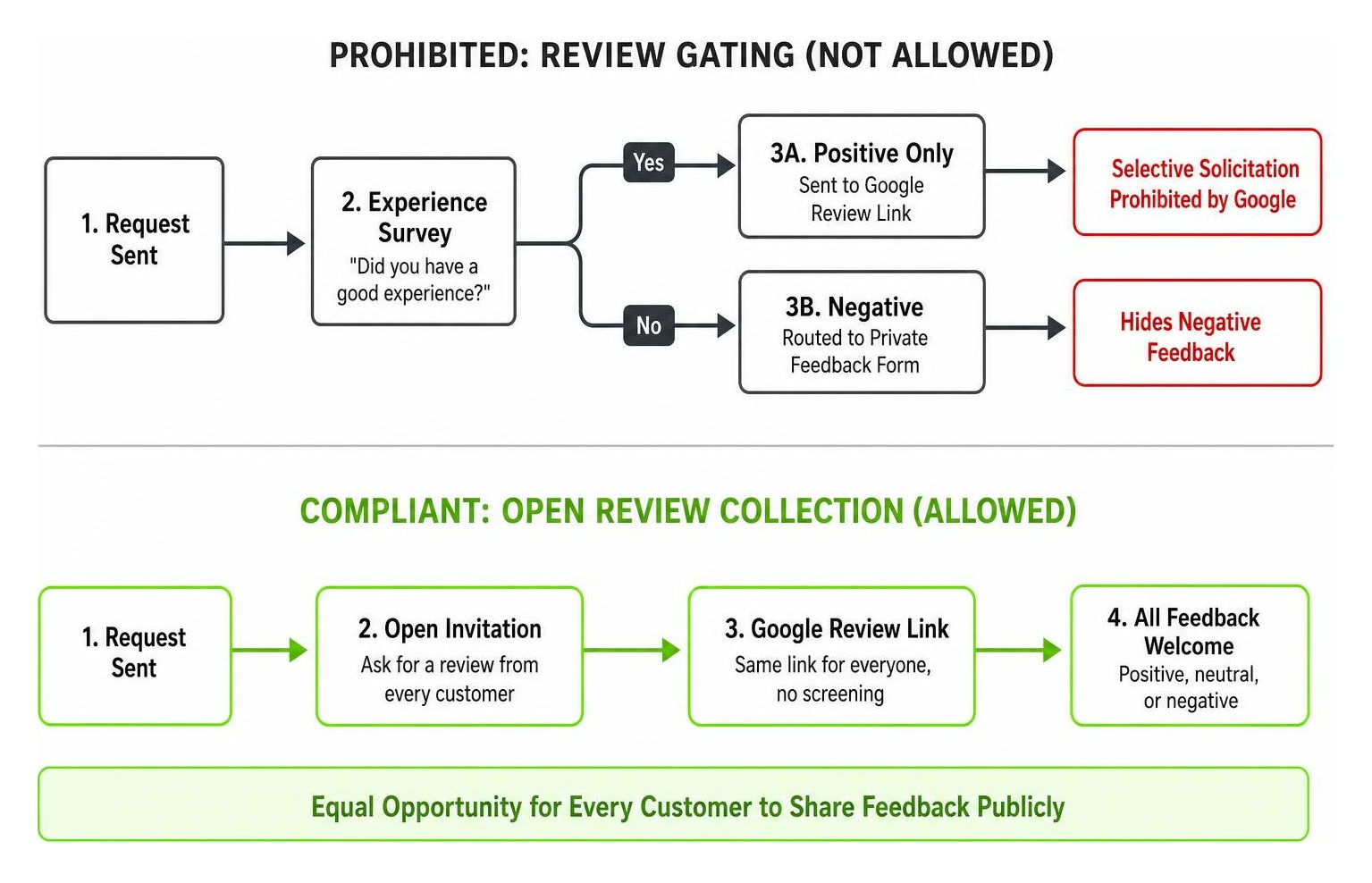
Keep these two golden rules in mind:
- No Incentives: You must never offer discounts, free gifts, cash, or entries into a raffle in exchange for a review. Google classifies this as “fake and misleading content.”
- No Review Gating: Review gating is the practice of pre-screening customers. For example, sending a survey that asks, “Did you have a good experience?” and only sending a Google review link to those who answer “Yes” while routing unhappy customers to a private form. Google strictly prohibits selective solicitation. You must give every customer an equal opportunity to leave feedback publicly.
Displaying Reviews on Your Website to Build Trust
Once you start receiving fantastic reviews, you should showcase them where your website visitors can see them.
Integrating a review widget on your homepage or landing pages provides instant social proof. It reassures visitors that they are in the right place and can significantly boost your website’s conversion rates. To learn more about how to repurpose this content, check out How to Leverage Customer Reviews and Testimonials to Boost Your Online Reputation and How to Re-Purpose a Review.
Streamlining Operations with Google Review Management Tools
As your business grows, managing reviews manually can become overwhelming. Fortunately, there are dedicated software platforms designed to automate and simplify the process. In fact, 94% of businesses that use review management tools see tangible investment returns.
Using a centralized system allows you to send automated requests, monitor incoming feedback across multiple platforms, and keep your online reputation healthy without spending hours on it every week. To understand the value of setting up a structured workflow, read about The Importance of Having a Review System and explore options like the Google Review Management Tool for Small Businesses | Get More Review.
Best Practices for In-House Google Review Management
If you choose to handle your reviews in-house, you need a clear system to keep things running smoothly. Here are a few best practices to implement:
- Delegate Responsibility: Assign one person (or a small team) to monitor and respond to reviews so that nothing slips through the cracks.
- Set Up Alerts: Enable real-time email or SMS notifications for new reviews so you can respond promptly, especially to negative feedback.
- Use Templates Wisely: Create a library of response templates for different scenarios to save time, but always customize them with the reviewer’s name and specific details before hitting submit.
For more actionable tips on building an in-house workflow, read our guide on how to Improve Your Online Reputation.
Managing Reviews at Scale with APIs
For larger businesses or franchises with multiple locations across Alabama, manual tracking is virtually impossible.
In these cases, developers can use the Google Business Profile APIs to programmatically pull review data and post replies directly from an internal customer relationship management (CRM) system or custom dashboard. To learn more about the technical requirements and capabilities of developer tools, you can read the official guide on how to Work with review data | Google Business Profile APIs | Google for Developers.
How to Handle and Report Policy-Violating Reviews
Unfortunately, not every negative review is legitimate. You may occasionally receive fake reviews from competitors, disgruntled former employees, or internet trolls who have never used your services.
When this happens, you do not have to sit back and take it. You can protect your business by identifying and reporting reviews that violate Google’s policies. For a starting point on dealing with malicious feedback, look at our resources on Reputation Management and the official guide to Report inappropriate reviews on your Business Profile – Google Business Profile Help.
Identifying Prohibited and Restricted Content
Google will only remove a review if it clearly violates their content guidelines. You cannot request the removal of a review simply because you disagree with the customer’s perspective or dislike their rating.
Some of the most common policy violations include:
- Harassment or Hate Speech: Reviews that contain offensive language, personal attacks, or discriminatory remarks.
- Conflict of Interest: Reviews left by competitors, current employees, or the business owner themselves.
- Off-Topic Content: Reviews that discuss social or political views rather than a genuine customer experience.
For a comparison of how other platforms handle these issues, you can also read about How to Delete a Review on Yelp.
Using the Google Reviews Management Tool
To flag an inappropriate review and track its status, Google provides a dedicated Manage your Google Business reviews workflow.
Through this tool, you can submit a removal request by selecting the specific policy violation. Once submitted, Google’s team will evaluate the review, which typically takes several days. If Google decides not to remove the review and you still believe it is a clear violation, you can use the tool to submit a one-time appeal for up to 10 reviews simultaneously.
Frequently Asked Questions About Google Reviews
Do customers need a Gmail address to leave a Google review?
No. While customers must be signed into a Google Account to leave a review, they do not need a Gmail address. Anyone can create a Google Account using their existing non-Gmail email address (such as Yahoo, Outlook, or a custom business domain). This removes a major barrier for clients who might otherwise hesitate to leave feedback because they do not use Gmail.
Why are some of my Google reviews not showing up?
If you notice that a client’s review is missing, it is usually because Google’s automated spam detection filters flagged it. This can happen if the reviewer used a brand-new account, posted from an IP address associated with spam, or used language that triggered the algorithm. For a detailed breakdown of why this happens and how to address it, read Google Business Profile Reviews Not Showing Up? Here’s Why.
Can I delete a negative Google review left by an unhappy customer?
No. As a merchant, you do not have the power to delete reviews left on your Business Profile. This is a common misconception. The only way a review can be removed is if the customer chooses to delete it themselves, or if Google removes it because it violates their official content policies. Your best course of action is always to respond professionally and attempt to resolve the issue directly with the customer.
Take Control of Your Reputation Today
Managing your Google reviews doesn’t have to be a source of stress. By setting up a simple, consistent system, you can protect your hard-earned reputation, build lasting trust with your local community, and send powerful signals to Google that will help your business stand out in search results.
At Fusion One Marketing, we specialize in helping local home service businesses in Birmingham, Huntsville, and Helena, AL, dominate their local markets. Through our comprehensive “Digital Domination” program, we handle everything from integrated SEO and custom website design to active review management and PPC campaigns.
If you are ready to grow your business, save time, and build an online reputation your competitors will envy, let’s talk. Learn more about how to Get More Reviews and Grow Your Business with us today!