

How to Spot Fake 1 Star Google Reviews vs. Legitimate Complaints
Before jumping into fight-or-flight mode, you need to verify whether that negative rating is actually a fraudulent post or just an unhappy customer having a bad day. Confusing a legitimate customer complaint with a fake review can lead to disastrous public relations blunders if you publicly accuse a genuine buyer of being a scammer.
Spotting fake 1 star google reviews requires a careful look at your internal record-keeping systems and user account histories. When a real customer experiences poor service, they usually leave specific, descriptive details regarding their interaction. Conversely, bad actors leaving fake ratings typically leave generic text or no text at all.
To determine what you are dealing with, cross-reference the reviewer’s display name against your CRM, scheduling software, dispatch logs, and invoicing systems. If no match appears, you may be facing a fake review.
| Feature | Genuine Bad Review | Fraudulent / Fake 1-Star Review |
|---|---|---|
| Customer Name | Matches internal CRM, invoice, or booking records | Generic name, alias, or no match in customer database |
| Review Content | Specific dates, service details, or employee names | Vague language, non-existent services, or no text |
| Reviewer Profile | History of reviews across various local businesses | Brand-new account, single review, or widespread 1-star spam |
| Timing Pattern | Occurs shortly after a real service touchpoint | Appears in sudden, unnatural spikes or overnight clusters |
| Demands / Contact | Seeks refund, repair, or resolution through standard channels | Off-platform messages demanding money, gift cards, or crypto |
Red Flags of Coordinated Review Bombing Attacks
A review bombing attack occurs when multiple negative ratings hit your Google Business Profile within a short timeframe. Recognizing the red flags early helps you build a strong case for Google to take action:
- Unnatural Attack Spikes: Receiving three, five, or ten 1-star ratings within a 24-to-48-hour period when your normal review velocity is a few per week.
- Generic Profiles and Names: Accounts with generic default avatars, names like “John Doe” or series of random numbers, and accounts created on the exact day the review was posted.
- Vague or Copied Text: Reviews that use generic phrases like “terrible service” or “unprofessional company” without describing what actually happened. In some cases, scammers accidentally mention services you don’t even offer, like auto repairs on an HVAC business listing.
- Phone Numbers Embedded in Reviews: Fraudulent profiles that put a phone number directly inside the review text or profile photo—a clear policy violation used to bait business owners into calling off-platform extortionists.
- Competitor Involvement: Sudden review spikes coincided with mentions or direct links recommending a local competitor.
Evidence Gathering and Customer Record Verification
Before submitting any flags or formal appeals to Google, assemble a organized digital evidence file. Having concrete proof dramatically speeds up the escalation process.
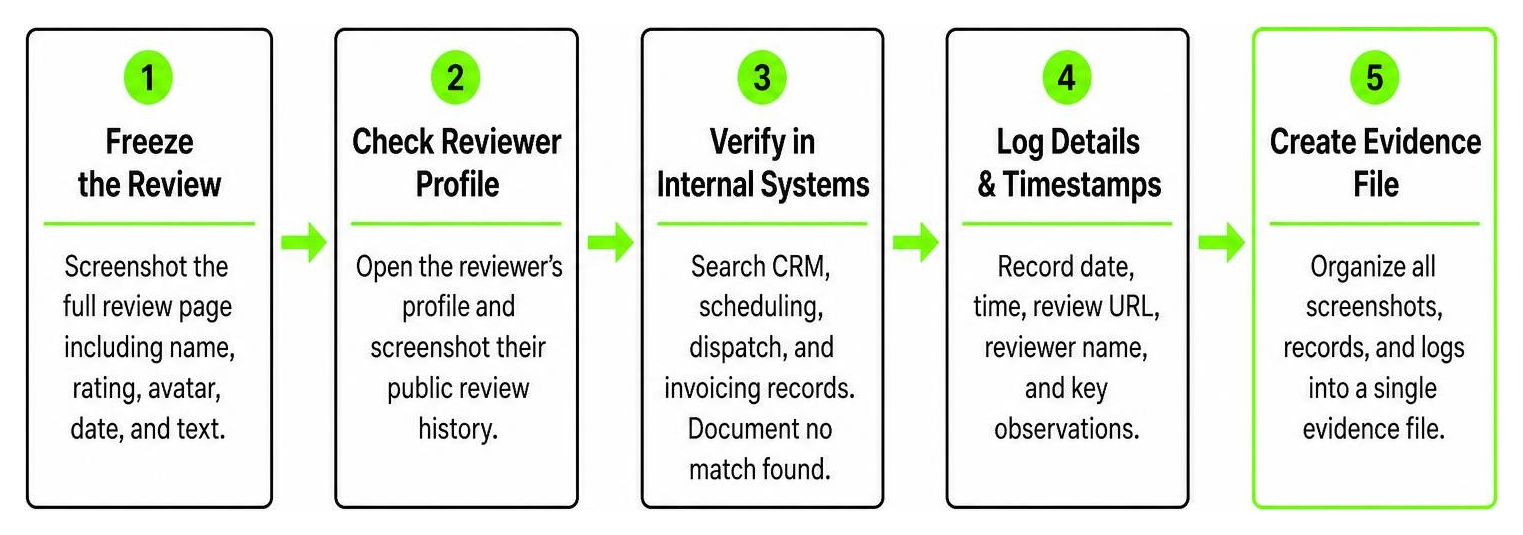
- Freeze the Evidence: Take full-page screenshots of the review immediately, ensuring the display name, star rating, avatar, post date, and review text are visible.
- Document Account Profiles: Click on the reviewer’s profile and screenshot their public history. Note if they have left identical 1-star ratings across unrelated businesses in different cities on the same day.
- Log Internal Transaction Checks: Run searches across your CRM and accounting software. Document proof showing no invoice, appointment, or communication log exists for that name.
- Track Timestamps and Incident Logs: Maintain a spreadsheet listing the exact date, time, review URL, and reviewer details for every suspicious entry during an attack.
Immediate Steps to Flag, Report, and Remove Fake Reviews
Google uses machine-learning models alongside human reviewers to monitor content, removing millions of policy-violating posts annually. However, automated systems don’t catch everything. When fake reviews slip through the cracks, you must take manual action.
How to Flag Fake 1 Star Google Reviews for Removal
Removing a fake review starts directly within your Google Business Profile (GBP) dashboard. Follow this step-by-step flagging workflow:
- Log into the Google account that manages your Google Business Profile.
- Navigate to Google Maps or Google Search and open your business profile.
- Locate the suspicious 1-star review and click the three dots in the top-right corner of the review box.
- Select Report review.
- Choose the specific policy violation that applies. Do not pick a category randomly; select Spam, Conflict of Interest (if competitor-driven), or Fake Engagement.
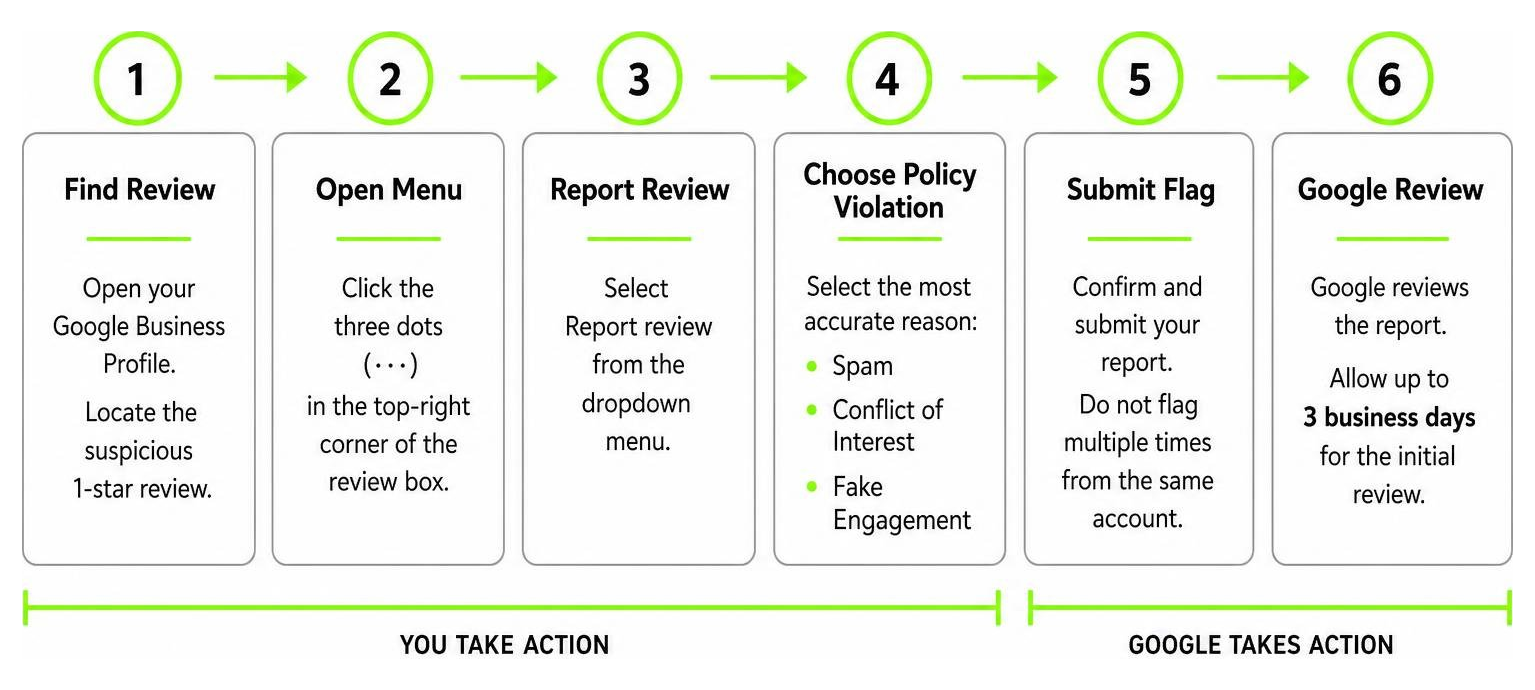
Never flag a review multiple times from the same manager account, as this will not speed up the process. Once submitted, allow Google 3 business days to process the initial flag.
Escalating Unresolved Reviews to Google Support
If 3 days pass and the fake review remains live, escalate the issue through formal channels.
First, access the Google Business Profile Reviews Management Tool. Select your business, check the status of your reported review, and if Google responded with “No Policy Violation,” submit a formal appeal detailing your evidence.
If standard appeals fail, utilize the Google Business Redressal Complaint Form or post directly on the official Google Business Profile Community support forum. Community Product Experts on the forum can escalate clear instances of review bombing, harassment, and policy violations directly to internal Google teams.
How to Publicly Respond to Fake Reviews Without Escalating
While waiting for Google to process your removal request, potential customers are looking at your profile right now. How you respond publicly dictates how readers judge your brand’s professionalism.
Crafting a Professional Response to Fake 1 Star Google Reviews
Your public response isn’t meant to convince the fake reviewer—it’s written for the dozens of prospective clients reading your reviews.
Keep these key elements in mind when drafting your response:
- Keep your message concise (under 100 words).
- Maintain a professional, calm, and matter-of-fact tone.
- Clearly state that you have searched your records and cannot find any record of their service or business interaction.
- Provide a direct, offline contact channel (such as a management email address) so legitimate customers can reach out.
- Never call the reviewer a “liar” or make angry personal attacks online.
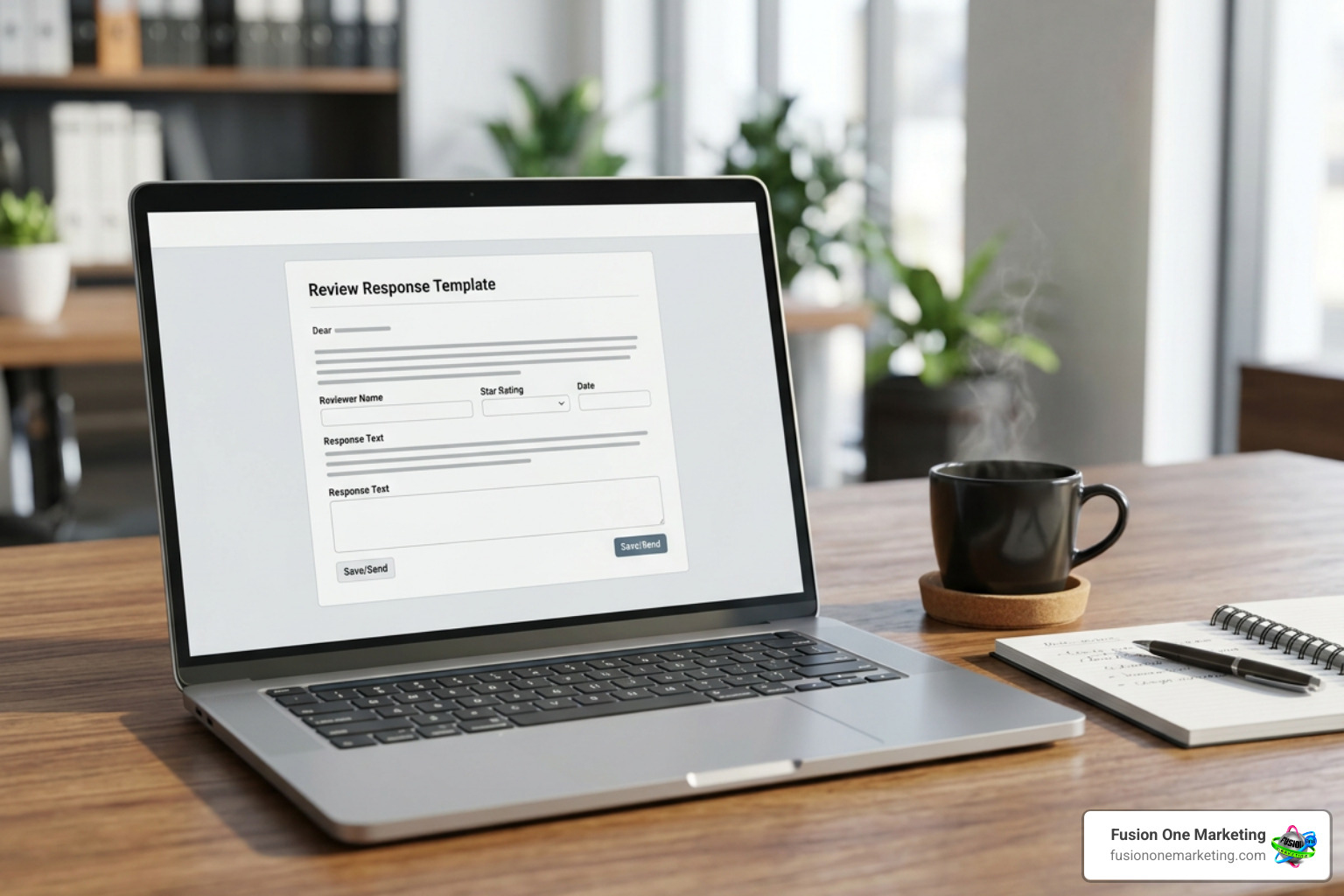
Here is a tested response template you can adapt:
“Thank you for reaching out. We take customer satisfaction very seriously, but after thoroughly searching our records, we cannot find any record of a customer or service interaction under this name. We strive to deliver top-quality service to every client. If you did receive service from us, please contact our management team directly at [email/phone] so we can investigate and resolve this issue right away.”
De-escalating Tension and Converting Negative Touchpoints
If a bad review turns out to be a genuine customer complaint rather than a fake account, treat it as an opportunity to demonstrate exceptional service. Learning how to handle negative feedback online properly protects your local reputation and shows prospective buyers that you stand behind your work.
Promptly acknowledging real concerns and offering an offline resolution can often convince an unhappy client to update or remove their negative rating, allowing you to turn a negative review into a positive experience.
Legal Options, FTC Rules, and Escalating Extortion Schemes
In recent years, bad actors have turned fake reviews into extortion rackets—flooding a business with bad ratings and demanding money, gift cards, or cryptocurrency to delete them.

Reporting Review Scams and Extortion to Authorities
If you fall victim to an extortion scam, never pay the ransom. Paying scammers signals that your business is an easy target and inevitably invites follow-up extortion demands.
Instead, follow this escalation protocol:
- Document All Demands: Save screenshots of text messages, WhatsApp chats, emails, or direct messages containing extortion demands and payment requests.
- Submit Google’s Merchant Extortion Form: Use Google’s specialized report forms dedicated to harassment and financial extortion to flag the accounts involved.
- File a Local Police Report: Report the cyber-extortion scheme to your local police department. Having an official police case number strengthens your appeals with platform support teams.
- Report to Regulatory Agencies: Under the FTC’s Consumer Review Rule, federal authorities actively prosecute deceptive review practices, imposing civil penalties of up to $53,088 per violation for fake reviews and review suppression tactics. File reports directly at ReportFraud.ftc.gov.
Proactive Reputation Defense: Protecting Your Rating and Local SEO
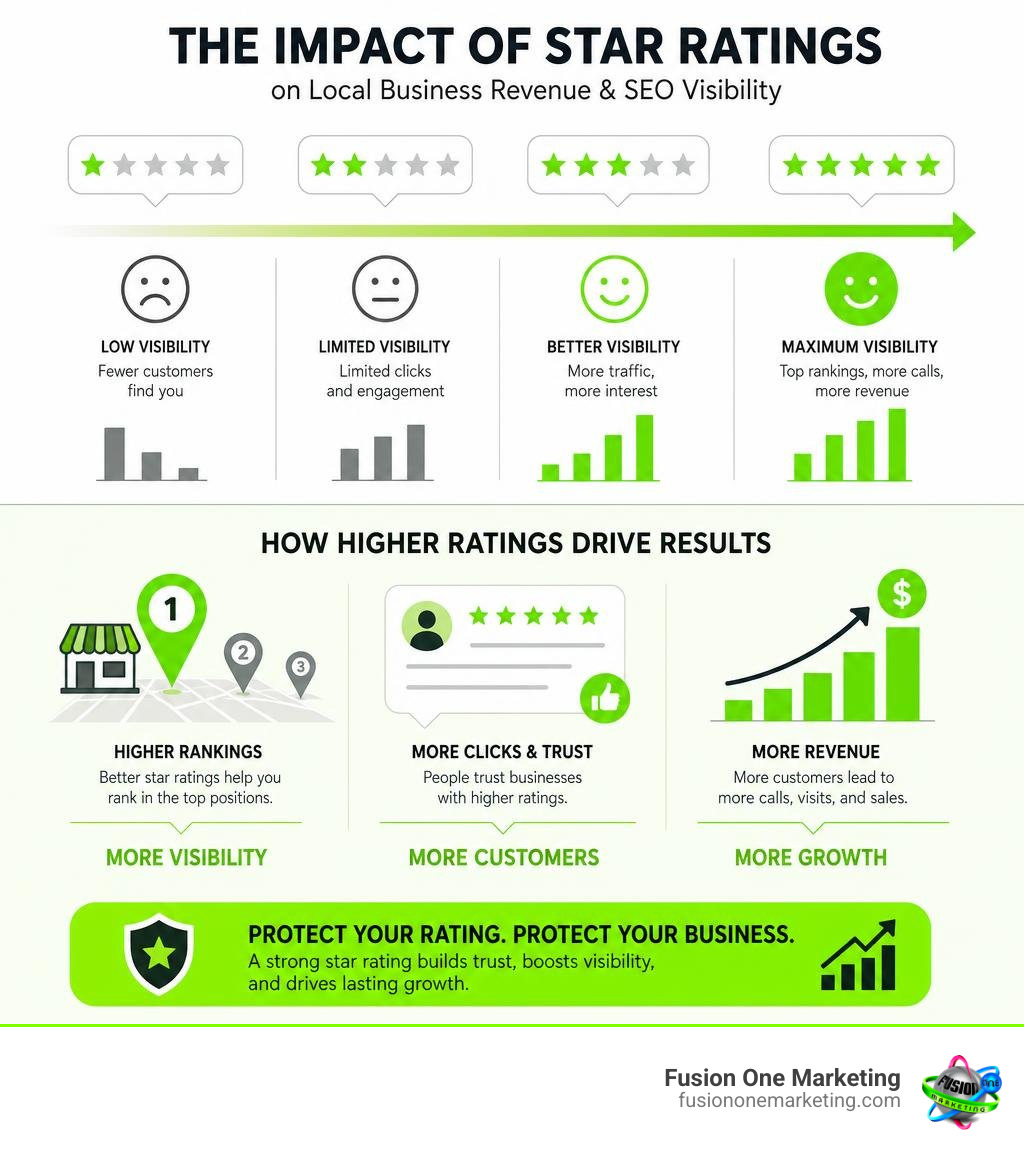
Removing fake reviews is only half the battle; building a resilient, high-volume review ecosystem is the ultimate defense. Understanding whether do Google reviews impact your SEO makes one thing clear: review volume, velocity, and average star ratings directly dictate your visibility in the Google Map Pack.
Building a High-Volume Positive Review Engine
Diluting the impact of a isolated fake 1 star google review requires consistently collecting authentic positive feedback from satisfied clients. When you have hundreds of genuine 5-star ratings, an occasional fake 1-star post won’t budge your overall score.
Follow these proven steps to build your positive review engine:
- Automate Post-Job Requests: Send automated SMS or email review links within 24 hours of completing a job while the positive experience is fresh in the customer’s mind.
- Simplify the Direct Link: Never ask clients to “find us on Google.” Provide a direct link or use custom signage. Learn how to get a rate us on google sticker with a qr code for your service vehicles or front desk.
- Train In-Field Techs: Teach home service technicians to ask satisfied homeowners for feedback right after finishing a job. In-person review requests convert at over 70%.
- Maintain Consistency: Establish an ongoing system to collect steady positive feedback week after week. Read the ultimate guide to getting more Google reviews to refine your customer outreach strategy.
Frequently Asked Questions About Fake Google Reviews
How long does Google take to remove fake reviews, and what if they refuse?
Initial evaluation after flagging a review typically takes 3 to 14 business days. If you escalate the review via Google Business Profile Support or Redressal forms, human evaluation can take between 1 to 3 weeks.
If Google initially refuses to remove a fake review, collect additional cross-account pattern evidence—such as proof that the reviewer account left identical bad ratings across other businesses—and re-escalate through the Google Business Profile Help Community forum.
Can you sue someone for leaving a fake 1-star review?
Yes, you can legally sue an individual for defamation, libel, or tortious interference if they publish false statements of fact that cause demonstrable financial harm.
However, filing a defamation lawsuit often requires issuing subpoenas to ISPs to identify anonymous account holders, with legal costs typically ranging from $5,000 to over $25,000. Legal action should be viewed as a last resort when major financial damages are involved.
Can fake reviews be completely prevented?
No, open review platforms like Google Maps cannot completely block unauthorized users from posting.
However, you can neutralize their impact by setting up real-time review alerts, maintaining active profile oversight, and building an automated review collection engine that dilutes negative ratings faster than scammers can post them.
Take Control of Your Digital Reputation
Dealing with fake 1 star google reviews can feel overwhelming, but you don’t have to navigate review attacks and local search challenges by yourself. Building a dominant online presence requires a complete, proactive strategy that protects your brand name while continually bringing in qualified local leads.
At Fusion One Marketing, our all-in-one Digital Domination program provides home service providers and local businesses with fully integrated web design, SEO, PPC, and reputation management. We help you take control of your Google Business Profile, neutralize negative review attacks, and build a review engine that outshines the competition.
Ready to protect your reputation and grow your business? Explore how to get more company reviews and grow your business or reach out to the digital marketing team at Fusion One Marketing today!