
Why Advertising on Google Ads Is the Fastest Way to Get Found by Customers Ready to Buy
Advertising on Google Ads puts your business in front of people who are actively searching for what you sell — right now, in your area, at the exact moment they’re ready to act.
If you’re a home services business owner trying to get more leads, here’s the quick answer:
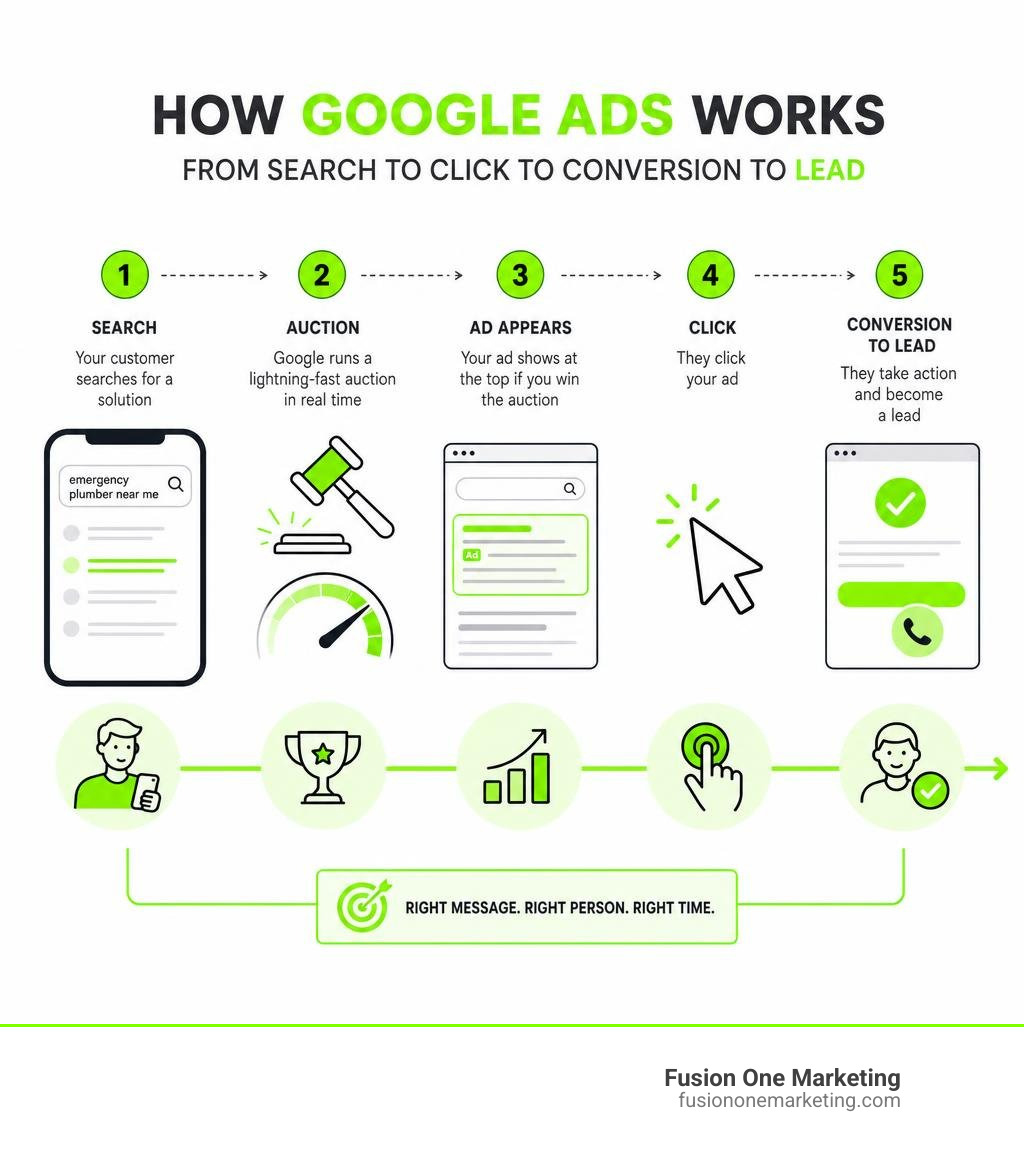
How Google Ads works in 5 steps:
- You choose keywords your customers search for (like “emergency plumber near me”)
- Google runs a lightning-fast auction every time someone searches
- Your ad appears at the top of results if you win the auction
- You only pay when someone clicks your ad
- That click goes to your website or calls your phone directly
Google Ads reaches customers across Google Search, YouTube, Google Maps, and the Display Network. Its AI analyzes real-time signals to predict who is ready to buy — and shows your ad to those people first.
For a home services business like an HVAC company or plumbing contractor, that means no more waiting months for SEO to kick in. You can show up at the top of search results today.
But here’s the catch: most small business owners waste money on Google Ads because they don’t know how the system actually works. They set a budget, hit publish, and wonder why the phone isn’t ringing.
This guide walks you through everything — from how the auction works, to setting up your first campaign, to the optimization tactics that separate profitable campaigns from money pits.
What is Google Ads and How Does It Work?
Google Ads is Google’s online advertising platform that allows businesses to display brief advertisements, service offerings, product listings, and videos to web users. It spans across multiple massive networks: Google Search, YouTube, Google Maps, and the Google Display Network (which includes millions of partner websites and mobile apps).
But how does it actually function behind the scenes?
Every time a user types a query into Google, a lightning-fast, automated auction occurs. Google evaluates all advertisers bidding on keywords related to that query, determines which ads are eligible, ranks them, and decides exactly how much each advertiser will pay if their ad is clicked. This entire process occurs in milliseconds.
The magic of advertising on google ads lies in capturing high-intent traffic. Unlike traditional media or passive social media scrolling, search engine marketing captures users with high “buyer readiness.” When someone in Birmingham or Huntsville searches for “broken AC repair,” they aren’t looking for entertainment — they have an immediate problem and a credit card in hand.
By understanding the mechanics of Using Google Ads for online marketing – Google Ads Help, you can align your business offerings directly with these active searchers, capturing them at the exact moment of discovery and leading them to a buying decision.
The Core Benefits of Advertising on Google Ads
If you are weighing your marketing options, Google Ads offers several distinct advantages over other platforms:
- Measurable Growth: Unlike traditional billboards or print ads where you hope for the best, every single dollar spent on Google Ads is trackable. You know exactly how many people saw your ad, clicked it, and took action.
- Immediate Lead Generation: You can drive immediate phone calls, site visits, and form fills from customers who are ready to engage right now.
- Full Budget Control: You set your own daily limits and can pause, resume, or adjust your campaigns at any moment.
- Unmatched Reach: Google processes billions of searches daily. No other platform can match its ability to put you in front of local searchers the moment they need your services.
To understand how this fits into a broader digital marketing strategy, check out our insights on The Power of Pay Per Click Advertising and learn how a professional PPC campaign can transform your inbound lead flow. Additionally, using resources like Reach Customers & Sell More with Online Advertising – Google Ads can help you claim introductory ad credits to kickstart your campaign budget.
Demystifying the Google Ads Auction and Cost Structure
Many business owners assume that the advertiser who bids the most money always gets the top spot. Fortunately, that is not how Google works. Google wants to provide the best possible experience for its searchers, so it uses a system called Ad Rank to determine ad placement.
Ad Rank is calculated using several key factors:
- Your Bid: The maximum amount you are willing to pay for a click (Max CPC).
- Quality Score: An estimate of the quality and relevance of your ads, keywords, and landing page.
- Ad Rank Thresholds: The minimum quality and bid standards required for an ad to show.
- Context of the Search: Signals like the user’s location, device, time of search, and search terms.
- Ad Assets Impact: The expected effect of your ad extensions (like phone numbers, sitelinks, or location info).
Your Quality Score is highly dependent on your landing page experience. If a user clicks your ad looking for “tankless water heater installation” and lands on a slow, generic homepage that only mentions general plumbing, your Quality Score will suffer. If they land on a fast, mobile-friendly page dedicated entirely to tankless water heaters, Google rewards you with a higher Quality Score, which lowers your cost-per-click (CPC).
Because of this system, your actual CPC is often significantly lower than your maximum bid. You only pay the minimum amount required to beat the Ad Rank of the advertiser directly below you. To dive deeper into how this bidding dynamic affects your bottom line, read our guide on Google Ads Cost Per Click.
How Much Does Advertising on Google Ads Cost?
Your total cost is highly flexible because Google Ads does not have a setup fee or a mandatory monthly minimum. You control your budget by setting an average daily budget for each campaign.
On high-traffic days, Google may spend up to double your daily budget to capture valuable clicks, but your monthly spend will never exceed your daily budget multiplied by 30.4 (the average number of days in a month).
To help you understand how Google Ads compares to other popular platforms like Facebook, let’s look at a quick comparison:
| Feature | Google Ads | Facebook Ads |
|---|---|---|
| Primary User Intent | Active Search (High Intent) | Passive Browsing (Interest-Based) |
| Pricing Model | Cost-Per-Click (CPC) | Cost-Per-Thousand Impressions (CPM) |
| Best For | Direct Lead Gen & Immediate Sales | Brand Awareness & Audience Building |
| Average Local CPC | $2.00 – $10.00+ (Varies by industry) | $0.50 – $3.00 |
While Facebook is fantastic for visual storytelling and building brand familiarity, Google Ads is the undisputed king of direct-response lead generation. For a detailed breakdown of which platform fits your current business goals, check out our comparison on Google Ads or Facebook Ads Which One Is Better.
Choosing Your Campaign Type and Targeting Strategy
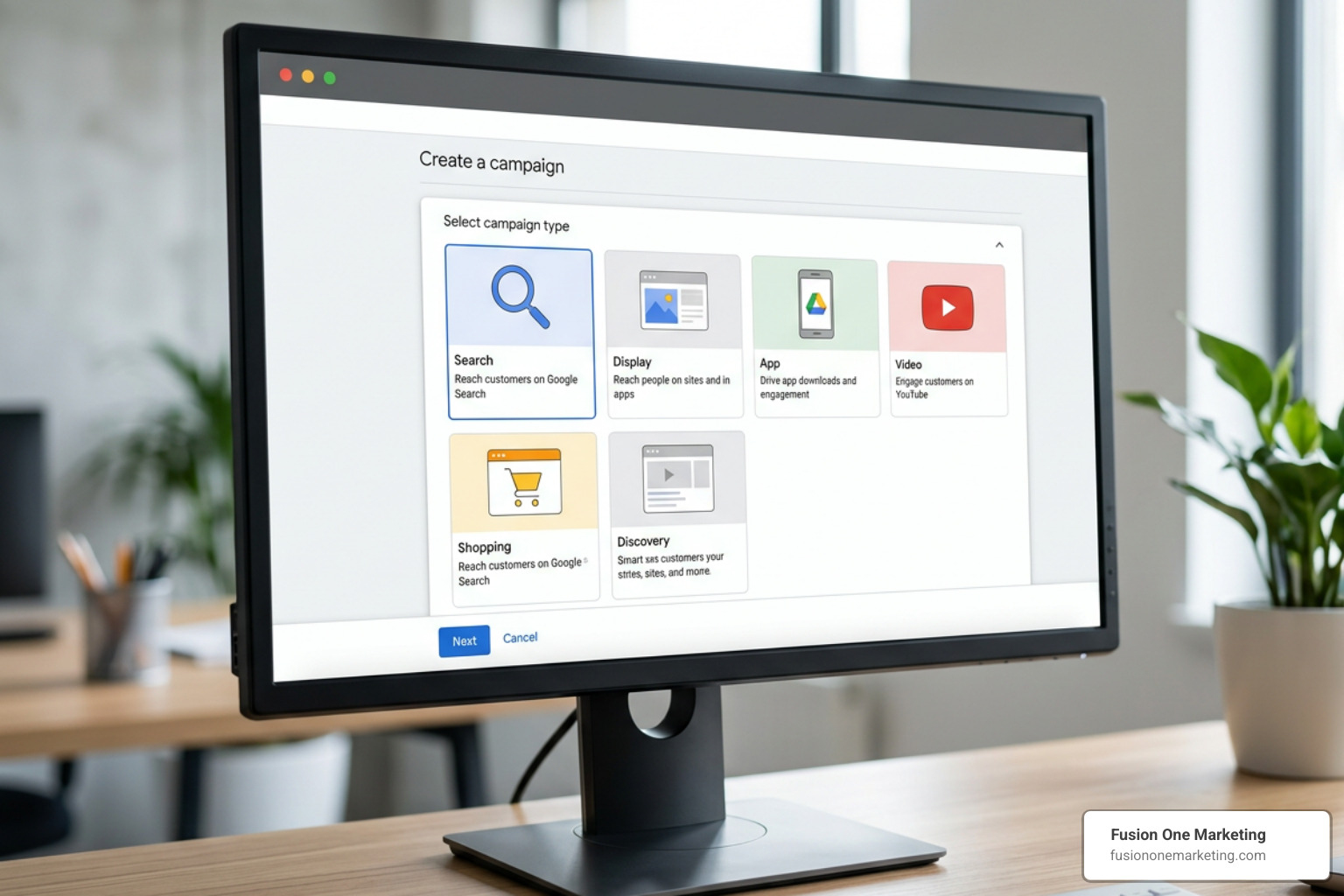
Google Ads offers several campaign types, each tailored to specific business objectives. Choosing the right one is critical to your campaign’s success:
- Search Campaigns: Text ads that appear on Google search results pages. These are the bread and butter for local home service businesses in Helena, Birmingham, and Huntsville.
- Display Campaigns: Visual banner ads shown across Google’s partner websites. Great for retargeting past website visitors.
- App Campaigns: Designed specifically to drive app downloads. Utilizing Set up an App campaign for installs – Google Ads Help can yield incredible results, with some businesses driving over a 400% increase in app downloads within six months.
- Performance Max Campaigns: An AI-driven campaign type that automatically optimizes bids and placements across Search, Maps, YouTube, and Display to maximize conversions.
To reach the right audience, you must leverage Google’s robust targeting options. This includes audience targeting (demographics, in-market segments, and remarketing lists) and content targeting (specific topics, keywords, and placements).
For a local service business, geographic targeting is your most powerful tool. You can target specific cities, radius zones around your office, or even zip codes in the Birmingham and Huntsville metro areas. To learn how to structure these settings correctly, refer to Targeting your ads – Google Ads Help and explore how to reach buyers across channels using Reach Customers Across YouTube & Search – Google Ads.
AI-Powered Campaigns and Audience Segments
Google’s machine learning has revolutionized how campaigns are managed. By analyzing millions of real-time signals — such as device, location, time of day, search history, and browser behavior — Google AI can predict buyer intent and adjust bids automatically.
Performance Max campaigns are a prime example of this technology in action, helping some retail businesses triple their sales revenue by finding high-value customers across all of Google’s channels simultaneously. To stay ahead of these rapid developments, check out our articles on Google Ads AI and the latest Google Ad Trends That Will Put You On Top.
Step-by-Step Guide to Launching Your First Campaign
Ready to launch? Here is a simplified step-by-step checklist to get your first campaign off the ground correctly:
- Define Your Objective: Sign in to your Google Ads account and select your primary goal (e.g., Leads or Website Traffic).
- Choose Your Campaign Type: For local service providers, we highly recommend starting with a Search Campaign.
- Set Your Geography: Target only the specific areas you service (for example, Helena, Birmingham, or Huntsville, AL). Avoid targeting the entire state unless you actually cover it!
- Determine Your Budget & Bidding Strategy: Start with a modest daily budget and use a bidding strategy focused on “Maximize Clicks” or “Maximize Conversions.”
- Conduct Keyword Research: Group your keywords into tightly focused ad groups. For example, keep “AC repair” keywords separate from “heater installation” keywords.
- Write Compelling Ad Copy: Write clear headlines that include your target keywords, highlight your unique selling points (e.g., “24/7 Emergency Service”), and include a strong call to action (e.g., “Call Now for 10% Off”).
- Add Ad Assets: Include call assets (phone numbers), sitelink assets, and callout assets to make your ad larger and more clickable.
- Set Up Conversion Tracking: This is non-negotiable. You must install the Google tag on your website to track when a click turns into a phone call or form submission.
For a comprehensive walkthrough of this setup, consult Create a campaign – Google Ads Help and download our complete Google Ads Checklist to make sure you don’t miss a single step.
Maximizing ROI: Optimization and Local Strategies
For home service businesses like HVAC or plumbing companies in Alabama, local targeting is everything. Local HVAC and plumbing companies typically spend between $1,500 to $5,000 per month on digital marketing, with aggressive pay-per-click (PPC) strategies averaging around $9,000 monthly to dominate their local market.
To maximize your return on investment, you should also leverage Local Services Ads (LSAs). These are the “Google Screened” or “Google Guaranteed” ads that appear at the very top of Google Search.
Unlike traditional PPC where you pay per click, LSAs charge you per lead (phone calls or direct messages from qualified local customers). You can learn more about setting these up through Reach Local Customers with Local Service Ads – Google Ads and reading About Local Ads – Google Ads Help.
To build a highly effective local presence in Alabama, it helps to understand how local campaigns are structured. By focusing your targeting on specific cities like Birmingham, Huntsville, and Helena, you can ensure your budget is spent only on high-intent local searches.
Common Pitfalls to Avoid in Your Campaigns
Many business owners run Google Ads for a month, see poor results, and declare that “Google Ads doesn’t work.” In reality, they likely fell into one of these common traps:
- Neglecting Negative Keywords: If you bid on “plumber,” your ad might show up for “plumber salary” or “free plumbing school.” Adding negative keywords prevents your ads from showing on irrelevant searches, saving you hundreds of dollars in wasted ad spend.
- Using Broad Match Keywords Incorrectly: Broad match tells Google to show your ad for any search remotely related to your keyword. For local service businesses, stick to Phrase Match (using quotation marks like
"AC repair") or Exact Match (using brackets like[AC repair Birmingham]) to keep your traffic highly relevant. - Sending Traffic to a Bad Landing Page: If your website is slow, hard to navigate on a phone, or doesn’t clearly display your phone number, visitors will click away immediately. You paid for the click, but you lost the lead.
To protect your budget, read our detailed guide on 4 Common PPC Mistakes and How to Avoid Them.
Frequently Asked Questions About Advertising on Google Ads
How long does it take to see results from Google Ads?
Unlike SEO, which can take several months to build organic authority, Google Ads provides immediate visibility. Your ads can go live and start driving phone calls the same day your campaign is approved. However, Google’s AI requires a “learning phase” of about 14 to 30 days to fully optimize your bidding and targeting based on conversion tracking data.
What is the minimum budget required for Google Ads?
There is no official minimum, but your budget must be realistic for your local market. If the average cost-per-click for “emergency plumber” in Birmingham is $15, a daily budget of $10 won’t even cover a single click. We recommend setting a budget that allows for at least 5 to 10 clicks per day to give your campaign enough data to convert.
Can I run Google Ads without a website?
Technically, you can run Smart campaigns that link to your Google Business Profile, but we strongly advise against it if you want to maximize your ROI. A dedicated, high-converting landing page built specifically for your ad campaign will always yield a higher conversion rate, a better Quality Score, and a lower cost-per-click.
Conclusion
Advertising on Google Ads is one of the most powerful tools available to grow your business, but it requires strategy, constant monitoring, and local expertise to turn clicks into profitable customers.
At Fusion One Marketing, we specialize in helping home services businesses in Birmingham, Huntsville, and Helena, AL dominate their local markets. Through our all-in-one Digital Domination program, we integrate custom web design, local SEO, social media, and professional PPC management into a single, cohesive engine designed to grow your business.
Ready to stop wasting money on unoptimized campaigns and start seeing real, measurable growth? Get Professional PPC Management from Fusion One Marketing today, and let us build a high-performing campaign that keeps your phones ringing!